
Describe the controller you always wanted
You do not have to be a programmer. Say what you want in plain words — “put my Juno's whole filter section on one page, with the envelope drawn on screen” — and an AI agent such as Claude Code builds it, loads it into your Electra One, watches it run on your real synthesizer, and fixes whatever is wrong. You listen and say what to change next.
Four situations people start from.
These are the situations Electra One presets are usually built for. They have little in common except that the answer to each one is a preset nobody ever created.
Parameters buried in menus
A synth has hundreds of parameters, four buttons and a two-line display. No editor was ever written for it, or the one that exists runs on an operating system from fifteen years ago. Everything is reachable over MIDI. Nothing is reachable quickly.
Controls spread across several instruments
Four machines on the desk, each with its own menus. The eight parameters you touch while playing sit on four different front panels, and no single page holds all eight.
Behaviour no product provides
A sequencer that works a particular way. A voice allocator that spreads one part across a bank of mono synths. A DMX light show that follows song position and the notes being played. Each one fits a single setup, which is why no manufacturer builds it.
Programming it means learning MIDI first
Electra One can do all of it, through its preset format and Lua. Doing that by hand means learning MIDI, SysEx and a scripting language before you start. That is the part the agent takes over.
Like having a developer sitting next to you, looking at your screen.
The thing that makes this work is not the AI. Plenty of tools write code from a description. The difference is that here the agent can see what its work actually did — on your hardware, with your instrument plugged in — and can therefore correct itself without you in the middle.
The same picture, in plain words
You say what you want
In your own language, the way you would explain it to a friend who knows your studio. No file formats, no code, no MIDI jargon required.
The agent looks things up and builds it
It reads how Electra One presets work and how your particular instrument speaks MIDI, then writes the layout, the knob assignments, and any behaviour you asked for.
It appears on the controller, by itself
The Electra One Editor sits on your computer, notices the new work, and sends it down the USB cable. Seconds, not a build process you have to understand.
The agent checks the result and tries again
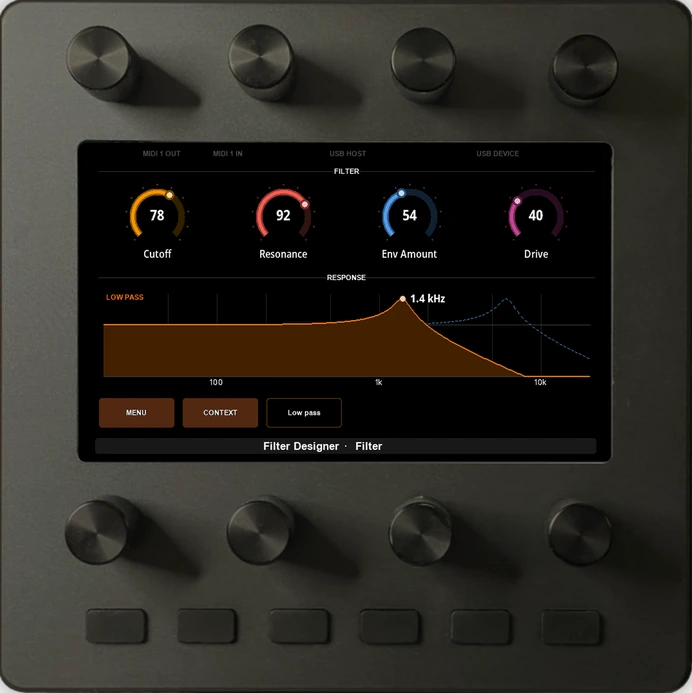
This is the part almost nothing else can do. It takes a picture of the controller's screen, reads what the preset reported, watches the messages going to and from your synth, and runs the preset's own tests. If a label is covered, a knob does nothing, or the synth answered wrong, it fixes that and goes round again — until the thing works on your desk.
You stay in the one role that matters: listening, playing, and saying what to change.
Requests, not specifications.
These are the kinds of sentences the loop starts from. Each one ends up as a preset that runs on the controller with your computer unplugged.
- “Make me an editor for my Matrix-1000. Every parameter, named, on pages that make sense.”
- “One page with the eight things I actually touch while playing, across three different synths.”
- “A step sequencer with the notes drawn on the screen, that follows my DAW's clock.”
- “When I pick a different oscillator type, show me only the knobs that apply to it.”
- “Read the current sound out of the synth when I load the page, so the screen never lies to me.”
- “A macro knob that opens the filter, raises the resonance, and speeds up the LFO together.”
Underneath there is a real machine to build on: a precise MIDI engine, a display the preset can draw anything on, and access to every port and message. The agent is how you reach it without learning it first.
Most hardware leaves an agent working blind.
It sees what happens
With most gear an agent writes something, hands it over, and you become the messenger: you load it, you look at it, you describe what went wrong. Electra One closes that loop instead.
- Screenshots. It sees the display exactly as you do.
- Logs. It reads what the preset reported while it ran.
- Live debugging. It can run code on the controller while it is switched on.
- The MIDI itself. It checks what your synth was sent, and what the synth answered.
- Tests. A preset can carry its own tests that the controller runs, so tomorrow's change does not quietly break today's.
It fixes its own work
Because it can see all of that, it does not need you to diagnose anything. It writes, uploads, runs, looks, and corrects — on its own, as many times as it takes.
What you are handed at the end is not a script to try out. It is a preset that is already running on your controller, already talking to your instrument.
It is yours afterwards
Everything it makes is an ordinary file in your own library: the layout, the behaviour, the tests. Open it in the Editor and move a knob by hand, keep versions as it grows, or share it with the community so someone else with your synth gets it for free.
Nothing about the result depends on the agent that wrote it, or on being online.
The assistant inside the editor.
The desktop Editor has an AI tab in the preset editor. It is an agent: it reads and changes the preset you have open through the same actions the interface uses, reads the reference documentation shipped with the app, and — with a controller connected — uploads the preset, reads the controller’s log and runs the preset’s Lua tests.
There is no account behind it. It runs on your own Anthropic API key, created at platform.claude.com and pasted into Settings. The key is kept in your system keychain, the requests are billed to your Anthropic account, and the key never leaves the machine. This is pay-per-use API access, which is not the same thing as a Claude Pro or Max subscription.
Claude Code, working in a folder.
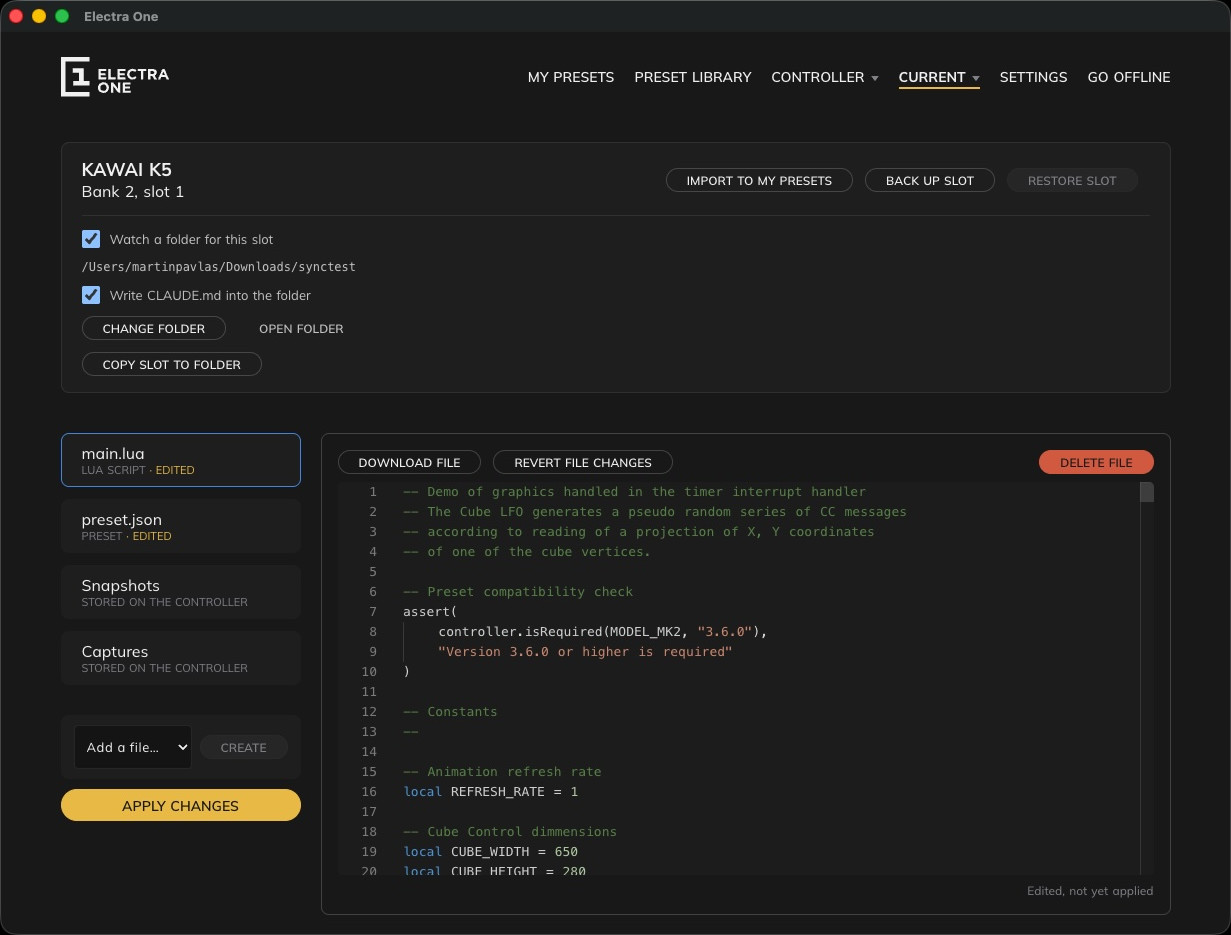
A preset slot is a handful of files, so the Editor can treat one as a folder on your disk. Point a slot at a folder and preset.json, main.lua, router.lua and the rest appear there as ordinary files — for Git, for VS Code, and for Claude Code, which works in that folder like any other project.
The Editor writes nothing into the folder except what is under .electra/: a request, what came of it, the controller’s log, the MIDI traffic, and a picture of the controller’s screen when one is asked for. That is how the agent sees what its change did.
Nothing reaches the controller on its own. A change on disk is staged and shown in the file list, and Apply changes writes it to the slot and reloads the preset.
Three things on your desk.
The offline Editor
For Mac OS, Windows, and Linux. It keeps your presets as plain files on your own computer, notices every change the agent makes, and sends it to the controller over USB. It also carries the reference the agent reads: how presets work, how Lua works, how MIDI and SysEx work, and worked examples. Try it with a 30-day trial, or read what the desktop Editor does.
An AI agent
Claude Code, Codex, or another coding agent, pointed at the folder your presets live in. Nothing Electra One specific has to be installed into it — the reference it needs and the feedback from the hardware both reach it through the Editor.
An Electra One, plugged in
The controller is what turns a guess into an answer: the preset runs on real hardware, against your real instrument, and what the screen and the MIDI actually did is what the agent reads back. Choose your Electra One.